The iPhone 17e packs a 6.1-inch screen, an A19 chip and MagSafe into a smaller, simpler phone, which is why so many people keep it for years. When it cracks or stops charging, bring it to our shop on West 35th Street near Penn Station. We'll look it over, give you the price before we start, and most repairs take under an hour. It's best to book an appointment so we can take care of you right away.

A cracked screen, lines, a dead touch zone, or a display that flickers all call for a screen repair. Most take under an hour, and we'll give you the price before we start.

If your 17e dies at 25%, gets warm on the charger, or won't turn back on after the battery runs flat, check Settings > Battery > Battery Health first. If it looks worn, we'll test it and tell you if it needs replacing.

If the cable feels loose, charging stops and starts, or the phone says it's charging but the percentage doesn't move, the USB-C port is the first thing we check. We clean out the lint and replace the port only if it's damaged.
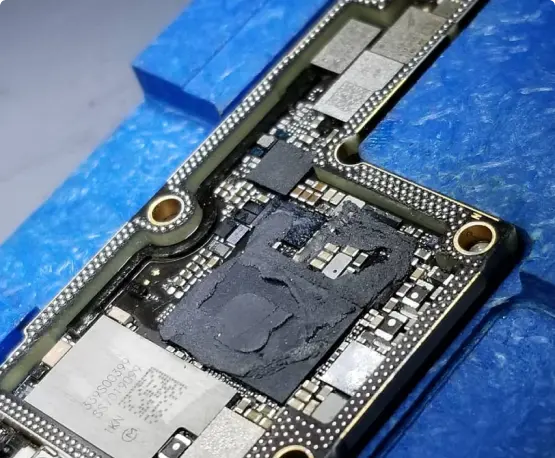
A 17e that won't turn on, restarts by itself, or went in the water needs a board-level look before you replace it. We were the first shop in NYC to offer board-level iPhone repair. Ask about data recovery too.


Try a different cable and a wall adapter instead of a computer port, then clean any lint out of the USB-C port with a wooden or plastic pick. If it still says charging but the number won’t move, or it only charges at a certain angle, the port or the battery is the cause. We check the port first.
Plug it in with a good cable for at least half an hour, since a fully drained phone can take a while to show the charging screen, then try a force restart. If there’s still no sign of life, the battery, the charging port, or the board could be behind it. We test each one before quoting a repair.
Rule out the carrier first. Turn on Wi-Fi Calling, try a different SIM or eSIM, update your carrier settings, and reset network settings. If the same SIM works well in another phone, bring the 17e in and we’ll test the antenna and the board.
Take off any thick case, card, or metal plate between the phone and the charger, and center it on a certified wireless charger. A phone that heats up will pause charging, so watch for heat. If wired charging works but wireless never does, the charging coil or the board may need repair.
Wipe the lens and remove any case or screen protector that covers it. Zoomed shots look softer in dim light, so test it in daylight too. If photos are still blurry in good light, or you hear rattling from the camera, it may be damaged and we’ll take a look.
Stop charging it if the screen is lifting. A bent frame can push the display up, and a swollen battery can do the same thing. Bring it in the same day and we’ll check the frame, the display, and the battery, and give you the price before we start.
Force restart it first (volume up, volume down, then hold the side button) and let it charge for a while. If it loops again, connect it to a computer and use the update option, not erase. If it keeps getting stuck, storage or the board may be the cause, so ask us about data recovery before anyone wipes it.