The iPhone 18 Pro has glass on the front and the back, and a drop onto the sidewalk can crack either side. Bring yours to our shop on West 35th Street near Penn Station. We’ll look it over, give you the price before we start, and most repairs take under an hour. It’s best to book an appointment so we can take care of you right away.

Lines across the display, a color tint, a screen that stops answering your touch, or a cracked corner all call for a screen repair. Most take under an hour, and you’ll hear the price before we start.

If your 18 Pro loses charge faster than it used to, runs warm sitting idle, or shuts off around 30 percent, check Settings > Battery > Battery Health first. We’ll test the battery and tell you whether it needs replacing.

Fast charging only works when the port makes good contact. If the cable wiggles, charging starts and stops, or it only works at an angle, we clean out the USB-C port first and replace it only if it’s damaged.
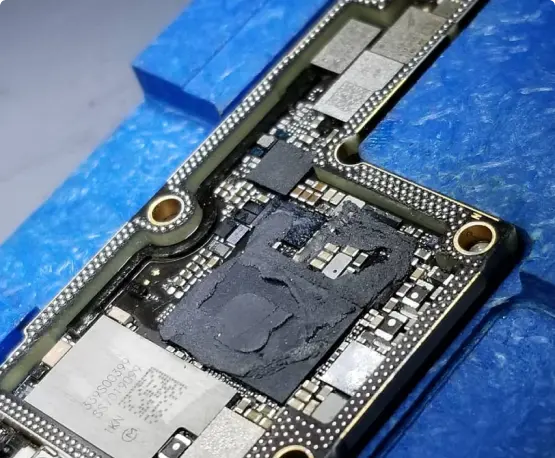
An 18 Pro that won’t turn on, keeps rebooting, or got wet needs a board-level look before you replace parts. We were the first shop in NYC to offer board-level iPhone repair. Ask about data recovery too.


Take off any screen protector, clean the glass, then force restart and install the latest iOS update, since some owners reported touch freezes on the new Pro models. If it keeps happening, especially after a drop, the display or its connector may be at fault. We test it before we quote you.
Update iOS, wipe the top of the screen clean, and set up Face ID again in Settings. Some owners reported restarts right after a failed Face ID scan. If it keeps doing it, particularly after a drop or a screen repair, the sensor or the board needs testing.
A force restart will tell you if it’s only a software glitch. If the lines stay, the display needs replacing. If the phone is brand new and was never dropped, ask the seller about a replacement before you pay for a repair.
A warm phone during fast charging is normal, more so in a case or in the sun. Use a good cable and charger, take the case off, and let it cool before charging again. If it runs hot sitting idle or the battery drains quickly, we’ll test the battery and the charging circuit.
Wipe the lens and take off any case or screen protector covering it. One owner reported that a strong magnet in a third-party accessory interfered with the variable aperture, so keep magnets away from the camera. If photos are still soft or the lens keeps clicking, bring it in.
Cracked glass can spread and let in dust and moisture, so it’s better not to wait. Bring it in and we’ll check whether it’s only the glass or the camera under it is hurt too. You get the price before we start.
A few days of faster drain after a big update is common while the phone re-indexes photos and apps. Check Settings > Battery > Battery Health after that. If capacity is low or the percentage keeps falling quickly, we’ll test the battery.