The iPhone 18 Pro Max is a large phone, and a big screen takes the worst of it when the phone lands on the sidewalk. Bring yours to our shop on West 35th Street near Penn Station. We’ll look it over, give you the price before we start, and most repairs take under an hour. It’s best to book an appointment so we can take care of you right away.

A cracked corner, ghost touches, a green or pink line, or a screen that freezes after a drop all point to the display. Most screen repairs take under an hour, and we’ll give you the price first.

Even a big battery wears out. If yours drains overnight, falls from 40 to 10 percent in minutes, or the case no longer sits flat, bring it in. We test it first and replace it only if it’s worn.

A loose cable, a charger that keeps disconnecting, or CarPlay that drops out can all come from a clogged or worn USB-C port. We clean it first. If the port is damaged, we replace it.
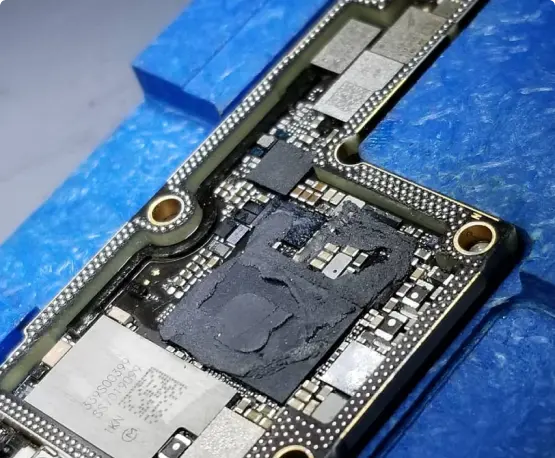
If your Pro Max won’t power up, keeps restarting, or lost service after a drop, the problem may be on the board. We were the first shop in NYC to offer board-level iPhone repair. Data recovery is available too.


Turn airplane mode on and off, update your carrier settings, and reset network settings. Some Pro Max owners on AT&T reported losing service entirely, so call your carrier too. If your SIM works in another phone but not in this one, we’ll test the antenna and the board.
Clean the screen, remove any protector, and install the latest iOS update, since some new Pro owners reported the screen freezing to touch. If it comes back, or it started after a fall, the display or its cable may be failing. We check it before we quote you.
Install the latest iOS update first and reset Face ID in Settings. Owners reported restarts after failed Face ID scans on the new Pro models. If it keeps happening after an update, or after a drop or screen repair, we’ll test the sensor and the board.
Force restart it to rule out a software glitch. If the lines come back, the display is the likely cause and it needs replacing. If the phone is new and has never been dropped, check with the seller about a replacement before paying for a repair.
Some warmth during fast charging is normal. Check for lint in the USB-C port and try another cable and charger. If the cable feels loose, charging cuts out, or the port area stays hot, we’ll inspect the port and test the battery.
The first week after setup is usually the worst, because photos and apps are still being indexed. After that, open Settings > Battery and see which apps use the most. If the drain stays high or capacity is low, bring it in and we’ll test the battery.
Power it off, don’t charge it, and skip the rice. Water damage keeps spreading, so the sooner it gets cleaned the better the odds. We open it up, clean the board, and test it before we replace anything.