Cracked glass, a battery that quits by lunch, a camera that won't focus. We fix the iPhone 16 at our shop on West 35th Street, near Penn Station. Most repairs take under an hour, and we'll look at the phone and give you a price before we start. It's best to book an appointment so we can take care of you right away.

Cracked glass is the repair we see most. If the screen is shattered, has lines running through it, or the touch has died in one spot, we can replace it, and most screen repairs take under an hour. Bring it in and we'll quote you before we start.

A phone that dies at 30%, runs hot on the charger, or shuts off for no reason usually needs a new battery. Check Settings > Battery > Battery Health, then bring it in and we'll test it before we replace anything.

The iPhone 16 uses USB-C, and the port collects pocket lint like any other. If your cable only works at an angle, or the phone charges on and off, we'll clean it out first. If the port is damaged, we replace it.
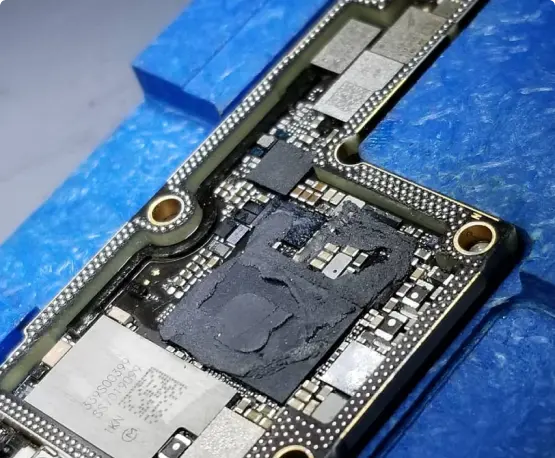
Water, a hard drop, or a phone that restarts on its own can come back to the logic board. We were the first shop in NYC to offer board-level iPhone repair and still do micro soldering here. Ask about data recovery too.


When your phone breaks, you don’t want it fixed tomorrow—you need it fixed today.

Oem Quality Parts in stock to make sure your repair comes out looking perfect.

If 10+ years in business wasn’t enough of a reason to trust us, we also provide a warranty with most repairs.

You get what you pay for. Do not trust your phone with the least expensive shop, our pricing coincides with the quality of parts and experience.

Our team members have vast knowledge and experience fixing various problems of different types of gadgets and devices.

In the case where your electronics are non salvageable we do offer other services such as data recovery.
Some iPhone 16 owners reported touch problems soon after launch, and Apple’s iOS 18.0.1 update reportedly addressed one known cause. If your screen still ignores taps, registers phantom touches, or has dead spots after updating, the display or its connector may be at fault. Bring it in and we’ll diagnose it before recommending a repair.
The Camera Control is the touch-sensitive button on the lower right side of the iPhone 16. Some owners report it sticking, not responding, or launching the camera by accident, and a tight case can cause accidental presses. Try a different case and check your Camera Control settings first. If it’s still stuck or dead, we can inspect it and let you know whether it’s repairable.
A full reboot can point to hardware, such as a failing battery or a logic board fault. If only the screen restarts back to the lock screen, that’s usually software, like a misbehaving app or corrupted settings. Update iOS and remove recently installed apps first. If random restarts or shutdowns continue, we can test the battery and board.
A new or freshly restored iPhone 16 often drains faster for the first few days while it finishes background setup. If the drain continues, the phone runs hot, or it shuts off with charge still showing, check Settings > Battery > Battery Health. A battery replacement may be the fix, and we can test it for you.
Failures reading cards or NFC tags are often software. Restart the phone, toggle Airplane Mode, and reset network settings. If tap-to-pay fails everywhere after that, it could be a hardware fault. Bring it in and we’ll diagnose it and tell you your options.
Camera lag and freezing are often fixed by updating iOS and giving a newly set-up phone time to finish background tasks. A black camera screen, especially after a drop, can mean a damaged camera module or connector. We can test the front and rear cameras and replace the part if needed.
The iPhone 16 charges over USB-C, and lint or debris can pack the port and block the connection. Try a different cable and charger first, and don’t use metal pins or sharp tools to clean the port. If charging is still intermittent, the port feels loose, or you see a liquid warning, we can inspect the port and clean or replace it.