The iPhone 17 finally got the smooth 120Hz screen that used to be a Pro feature, and it still cracks like every other phone. Bring yours to our shop on West 35th Street near Penn Station. We'll look it over, give you the price before we start, and most repairs take under an hour. It's best to book an appointment so we can take care of you right away.

Cracked glass, lines, a dead touch zone, or a display that stutters when you scroll are all screen repairs we do here, and most take under an hour. Bring it in and we'll quote it before we start.

If your 17 runs hot, drops 20% in an hour, or dies with charge left, check Settings > Battery > Battery Health first. Some drain after a big iOS update settles on its own in a day or two. If it doesn't, bring it in and we'll test the battery before we replace it.

A loose cable, slow charging, or a phone that only charges at an angle usually means lint in the USB-C port. We clean it out first and replace the port only if it's damaged.
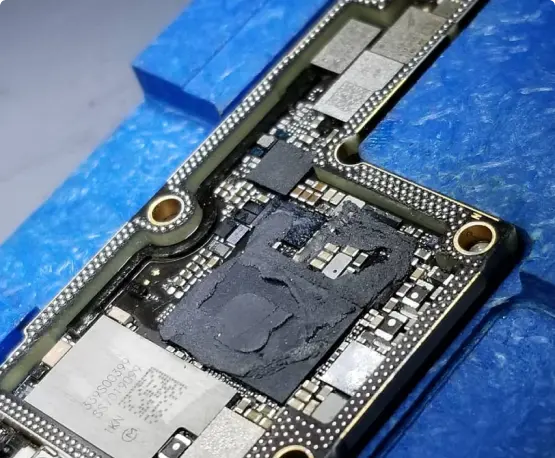
A 17 that won't turn on, restarts by itself, or went through the wash is worth a look before you replace it. We were the first shop in NYC to offer board-level iPhone repair. Ask about data recovery too.


When your phone breaks, you don’t want it fixed tomorrow—you need it fixed today.

Oem Quality Parts in stock to make sure your repair comes out looking perfect.

If 10+ years in business wasn’t enough of a reason to trust us, we also provide a warranty with most repairs.

You get what you pay for. Do not trust your phone with the least expensive shop, our pricing coincides with the quality of parts and experience.

Our team members have vast knowledge and experience fixing various problems of different types of gadgets and devices.

In the case where your electronics are non salvageable we do offer other services such as data recovery.
A warm phone for a day or two after a big update is normal, because it’s re-indexing photos and apps in the background. Some owners have reported heat that lingers after iOS 26 updates. If yours is still hot while sitting idle a few days later, we’ll test the battery and charging circuit.
Start with a restart and an update, then wipe the top of the screen clean and reset Face ID in Settings. Some owners reported Face ID trouble after recent iOS 26 updates. If it still fails, especially after a drop, the sensor assembly at the top of the phone may need repair.
Wipe the front camera lens and take off any screen protector that covers it. If selfies are still soft, black, or Center Stage won’t track you, the front camera module may be damaged. Bring it in and we’ll test it before replacing anything.
Forget the network and restart the router first, since most drops start there. If the iPhone 17 drops Wi-Fi and Bluetooth on every network, or only after a fall or water exposure, the antenna connections or board may be at fault. We’ll check.
The iPhone 17 can charge at up to 25W with a MagSafe or Qi2.2 charger, but only with a certified charger and a strong adapter. Check those and take the case off. If it still charges slowly or cuts out on a good charger, the coil or battery could be the issue.
Check for a screen protector that doesn’t sit flat, and make sure Low Power Mode isn’t on, because it limits the refresh rate. If dead spots or stutter stay after a restart, the display or its connector may have been damaged, and we’ll test it.
Yes. A cracked back can let in moisture and dust, and it can interfere with wireless charging. We can check the camera openings and the charging coil at the same time we repair the glass.