The iPhone 16 Plus has the biggest screen in the standard lineup, which also makes it the one that picks up the most cracks. If yours took a fall, bring it to our shop on West 35th Street, a short walk from Penn Station. Most repairs take under an hour, and we'll give you a price before we start. It's best to book an appointment so we can take care of you right away.

The Plus has the biggest display in the standard lineup, which makes it the easiest to crack. Shattered glass, lines, flickering and dead touch spots are all screen repairs we do here, and most take under an hour. We'll give you the price before we start.

The Plus carries the bigger battery, so if it drops 20% in an hour, something is wrong. Check Settings > Battery > Battery Health, then bring it in and we'll test it before we replace anything.

If you have to wiggle the cable to get a charge, or charging cuts in and out, pocket lint in the USB-C port is the usual cause. We clean it out first and replace the port only if it's damaged.
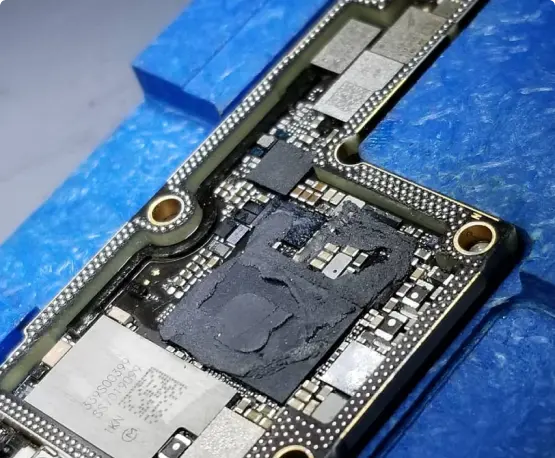
If your Plus won't turn on, restarts on its own, or went for a swim, the board may still be fixable, and so may your photos. We were the first shop in NYC to offer board-level iPhone repair.


When your phone breaks, you don’t want it fixed tomorrow—you need it fixed today.

Oem Quality Parts in stock to make sure your repair comes out looking perfect.

If 10+ years in business wasn’t enough of a reason to trust us, we also provide a warranty with most repairs.

You get what you pay for. Do not trust your phone with the least expensive shop, our pricing coincides with the quality of parts and experience.

Our team members have vast knowledge and experience fixing various problems of different types of gadgets and devices.

In the case where your electronics are non salvageable we do offer other services such as data recovery.
Lines, flickering, or a black screen on a phone that still buzzes or rings usually point to the display or the cable that connects it. The Plus has a lot of glass to flex when it hits the ground, and sometimes the screen is fine and the connector took the hit. We’ll test it before recommending a replacement.
First check Settings > Action Button and make sure it’s set to the action you expect. If it still feels stuck or does nothing, debris or a damaged cable behind the button could be the cause. Bring it in and we’ll take a look.
After a big iOS update the phone can spend a day or two re-indexing in the background, which drains the battery faster than usual. If it’s still losing a lot of charge while it sits idle after that, check Settings > Battery > Battery Health and bring it in. We’ll test the battery before replacing anything.
Start by taking the case off and checking that nothing metal, like a card or a ring, is between the phone and the charger. If it still won’t charge wirelessly but charges fine with a cable, the wireless charging coil may be damaged. We’ll test it and tell you what we find.
No. A cracked back is a repair, not a replacement. It’s worth fixing soon, because a crack can let in moisture and dust and can get worse with every drop. Bring it in and we’ll check the cameras and wireless charging at the same time.
Restart the phone, update iOS, and wipe the top of the screen clean first. If the message keeps coming back, especially after a drop or water exposure, the Face ID sensors at the top of the phone may need repair. We’ll check before suggesting anything.
Lint or dust in the speaker and microphone openings is the most common cause, and we can clean those out. If the sound is still bad after that, or the problem started after water got in, a speaker or microphone part may need replacing.