The iPhone Air is the thinnest iPhone we repair, so a drop or a hard squeeze in a back pocket can hurt it more than a thicker phone. Bring yours to our shop on West 35th Street near Penn Station. We’ll look it over, give you the price before we start, and most repairs take under an hour. It’s best to book an appointment so we can take care of you right away.

Cracks, flickering, lines, or a screen that stops answering touch all call for a screen repair. The Air is thin, so we handle the frame with extra care. Most take under an hour, and you’ll hear the price first.

A thin phone has a small battery, so wear shows up quickly. If yours dies early in the day, runs warm sitting idle, or shuts off at 20 percent, we test the battery and replace it only if it’s worn.

If the cable wiggles, charging starts and stops, or the phone only charges at an angle, the USB-C port is usually the cause. We clean it first and replace it only if it’s damaged.
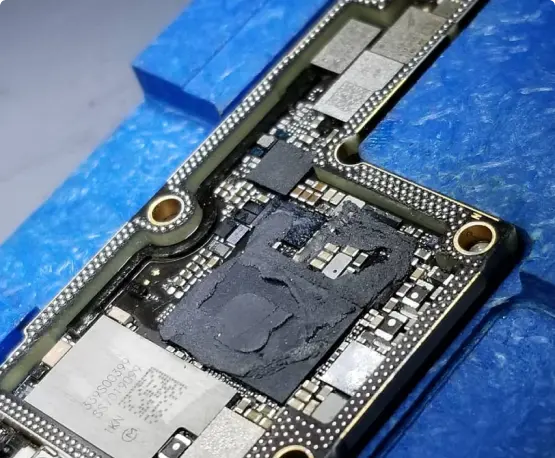
An Air that won’t turn on, keeps rebooting, drops calls, or got wet may need a board-level look. We were the first shop in NYC to offer board-level iPhone repair. Ask about data recovery too.


Plug it in, let it charge for a few minutes, then force restart. Some owners reported a frozen screen after a full drain, and the usual fixes are a different cable and a restart. If touch stays dead or it happens after a drop, the display or its connector needs testing.
Turn airplane mode on and off, update your carrier settings, and reset network settings. Some owners reported 5G dropouts and unstable calls on the Air. If your SIM works in another phone but not this one, we’ll test the antenna and the board.
Update iOS and turn off auto-brightness to see if it stops. Some owners reported flicker while adjusting brightness or switching apps. If it continues, or started after a drop, the display may be failing and we’ll test it before we quote you.
It’s a thin phone, so avoid carrying it in a tight back pocket and use a case that supports the frame. A hard drop can still crack the front or back glass. If it’s cracked or the frame looks bent, bring it in and we’ll check the damage before you pay.
Wipe the lens and take off any case or magnet accessory near the camera. If photos still look soft or the image shakes when you open the camera, the camera module may need repair. We test it first.
A smaller battery does drain sooner under heavy use, and the first week after setup is the worst. Check Settings > Battery for apps that use the most. If capacity is low or it falls quickly while idle, we’ll test the battery.
Power it off, don’t charge it, and skip the rice. Water damage keeps spreading, so the sooner it’s cleaned the better the odds. We open it up, clean the board, and test it before we replace anything.