The iPhone 17 Pro swapped titanium for an aluminum body and added a wide camera bar across the back, which means more glass to crack and more edges to catch a fall. Bring yours to our shop on West 35th Street near Penn Station. We'll look it over, give you the price before we start, and most repairs take under an hour. It's best to book an appointment so we can take care of you right away.

A cracked front, color bands, a patch that won't respond to touch, or flicker on the 120Hz display means it's time for a screen repair. Most take under an hour, and we'll give you the price before we start.

If your Pro dies at 30%, runs hot on the charger, or drops a few percent every time you restart it, check Settings > Battery > Battery Health first. If the numbers look bad, we'll test the battery and tell you if it needs replacing.

If the cable wiggles, charging keeps cutting out, or the phone only charges at an angle, the USB-C port is usually packed with pocket lint. We clean it out first and replace the port only if it's damaged.
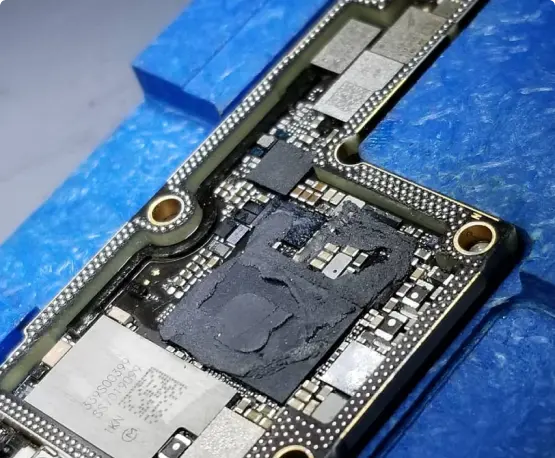
A Pro that won't turn on, keeps rebooting, or got wet needs a board-level look before you replace it. We were the first shop in NYC to offer board-level iPhone repair. Ask about data recovery too.


Not a defect. Some of what looks like scratching on a new Pro is residue from display stands, and it often wipes off with a soft cloth and a little isopropyl alcohol. Real scuffs on the aluminum frame or camera bar are cosmetic and don’t affect how the phone works. If the camera glass itself is cracked or the frame is bent, bring it in.
A warm phone while charging, filming 4K video, or using a hotspot is normal, more so in a case or on a hot day. Take the case off and let it cool before charging again. If it runs hot sitting idle, or the battery drops fast, we’ll test the battery and the charging circuit.
A percentage that jumps after a restart often means the battery gauge has lost track. Check Settings > Battery > Battery Health. If capacity is low or the phone shuts off at 20 or 30 percent, we’ll test the battery and tell you if it needs replacing.
Turn Wi-Fi and Bluetooth off and on, forget the network or device and reconnect, then reset network settings. If it still drops, especially after a fall or a splash, there may be a board problem behind it. We’ll test it and tell you what we find before any repair.
Cracked glass can spread, let in dust and moisture, and leave small shards on the edge, so it’s best not to keep using it that way. Bring it in and we’ll check whether it’s only the glass or the camera under it is hurt too. You get the price before we start.
Use a good USB-C cable and a charger that can put out enough power, and take off any thick case or metal plate that sits between the phone and a MagSafe charger. Lint in the charging port also slows charging or makes it quit in the car. We clean the port first and replace it only if it’s damaged.
Lines or dead spots after a drop usually point to the display or its cable, and a force restart will tell you if it’s only software. If the problem stays after a restart, the screen needs replacing. If a new screen still acts up, the board is next, and we test both before quoting.