The iPhone 16 Pro has a titanium frame, a 120Hz display and a third camera, and when something in there breaks it is rarely a one-size fix. Bring it to our shop on West 35th Street near Penn Station. We'll look it over, tell you the price before we start, and most repairs take under an hour. Book an appointment and we'll take care of you right away.

The 16 Pro's 120Hz display is the part most likely to meet the sidewalk. Cracks, lines, a green or pink tint, or touch that freezes up all point us to the screen. Bring it in and we'll test it and quote the repair before we begin. Most screen repairs take under an hour.

A Pro that runs hot or loses charge with the screen off is telling you something. Check Settings > Battery > Battery Health, then bring it in and we'll test the battery before replacing anything.

The Pro's USB-C port moves data faster than the standard iPhone 16, so a worn port can show up in file transfers as well as charging. If the cable drops out or the phone says an accessory isn't supported, we'll check the port and clean it before replacing it.
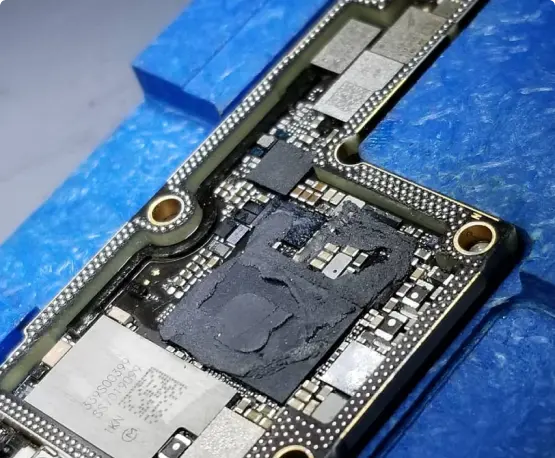
If your Pro went dead after a drop, restarts on its own, or got wet, the board may be repairable and your data recoverable. We were the first shop in NYC to offer board-level iPhone repair.


When your phone breaks, you don’t want it fixed tomorrow—you need it fixed today.

Oem Quality Parts in stock to make sure your repair comes out looking perfect.

If 10+ years in business wasn’t enough of a reason to trust us, we also provide a warranty with most repairs.

You get what you pay for. Do not trust your phone with the least expensive shop, our pricing coincides with the quality of parts and experience.

Our team members have vast knowledge and experience fixing various problems of different types of gadgets and devices.

In the case where your electronics are non salvageable we do offer other services such as data recovery.
Some iPhone 16 Pro owners reported the screen freezing, especially when a palm or finger rested near the Camera Control edge, and Apple’s iOS 18.0.1 update reportedly addressed part of it. If you’re fully updated and it still stutters or ignores touches, the display or its connection may be at fault. We’ll test it before recommending a repair.
Restart the phone and update iOS first, since several of these reports traced back to software. If it still crashes, or only one of the three lenses shows a black screen, we’ll test each lens to see whether it’s a camera module or something else.
A warm phone while recording 4K video or charging is normal. A phone that’s too hot to hold, or that gets hot doing almost nothing, is not. A battery or charging circuit problem could be behind it, so bring it in and we’ll test both.
First wipe the lens and take the case off, because a smudge or a thick case can blur a zoom shot. If photos are still soft at 5x but sharp on the main camera, the telephoto module could have been knocked out of alignment in a drop. We’ll check it.
Titanium resists dents better than most frames, but a hard drop can still tweak the frame and push up the edge of the display. Stop using the phone if the glass is lifting, because dust and moisture can get in. Bring it by and we’ll see whether the frame, the screen, or both need work.
Try another cable first, and clean the USB-C port carefully with a wooden toothpick, since pocket lint packs in tightly. If the message comes back with a cable you know works, the port or its connector may be damaged and we can replace it.
Check whether the flicker comes and goes with brightness or specific apps, since that points to software. A tint or flicker that shows up everywhere, especially after a drop or water exposure, usually means the display or its cable needs attention. We’ll test it before replacing anything.