The iPhone 17 Pro Max has a 6.9-inch screen, and that much glass takes the worst of it when the phone hits the sidewalk. Bring yours to our shop on West 35th Street near Penn Station. We'll look it over, give you the price before we start, and most repairs take under an hour. It's best to book an appointment so we can take care of you right away.

A cracked corner, lines across the display, a color tint, or touches that land in the wrong spot all call for a screen repair. Most take under an hour, and we'll give you the price before we start.

A phone this big should last all day. If yours dies at 20%, runs hot, or drains overnight, check Settings > Battery > Battery Health first. If the numbers look bad, we'll test the battery and tell you if it needs replacing.

If the cable feels loose, charging cuts in and out, or it only works at an angle, the USB-C port is usually full of lint. We clean it out first and replace the port only if it's damaged.
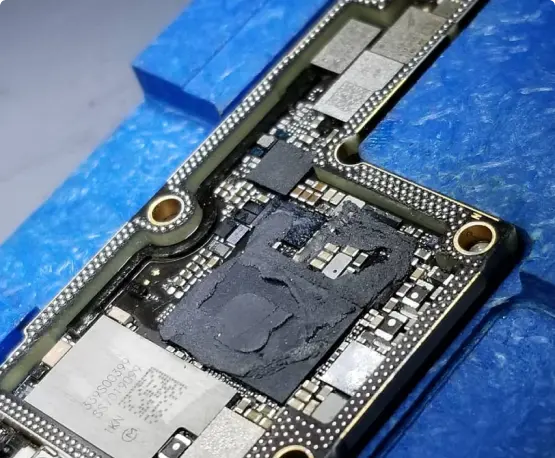
A Pro Max that won't turn on, reboots on its own, or got wet needs a board-level look before you replace it. We were the first shop in NYC to offer board-level iPhone repair. Ask about data recovery too.


Update iOS, free up some storage, and do a force restart (volume up, volume down, then hold the side button). If it still reboots on its own, or it started after a drop or getting wet, the battery or the board is usually the cause. We test both before quoting anything.
Rule out the carrier first. Turn on Wi-Fi Calling, try a different SIM or eSIM, and reset network settings. If the same SIM works fine in another phone, bring the Pro Max in and we’ll test the antenna and board, especially if it has been dropped.
Forget the device and pair it again, then try a different USB-C cable if you use wired CarPlay. Lint in the charging port is a common reason a cable keeps losing contact. If a good cable still drops out, the port itself may need cleaning or replacing.
Check Settings > Battery > Battery Health and see which apps are using the most. If maximum capacity is well below 80%, or the percentage falls quickly with little use, the battery is worn. We’ll test it and tell you if it needs replacing.
Look for lines, a color tint, dead spots, or touches that land in the wrong place. A display can be damaged inside even when the glass shows no crack, and hairline cracks tend to spread. Bring it in and we’ll check it and give you the price before we start.
Wipe the lens and take off any case or magnetic accessory sitting near the cameras. If zoomed photos are still soft or shaky, or you hear a buzzing or rattling from the camera, the stabilization may be damaged and the camera needs a look.
Power it off right away and don’t charge it. Skip the rice, because it doesn’t pull moisture out of the board. Corrosion keeps spreading, so the sooner you bring it in the better the odds. We open it up, clean the board, and test it before anything is replaced.